
M-Pesa Rent Collection for Kenyan Landlords: 2026 Guide
Learn how Kenyan landlords can use M-Pesa rent collection, STK Push, receipts, and payment reconciliation without manual spreadsheet matching.
Key Takeaways
- Introduction: Why M-Pesa Changed Everything for Kenyan Landlords
- The M-Pesa Rent Collection Challenge (And How to Solve It)
- How M-Pesa Integration Actually Works (Technical Made Simple)
- 7 Ways M-Pesa Integration Transforms Rent Collection
Published: November 30, 2024 Updated: July 3, 2026 Reading Time: 10 minutes Keywords: M-Pesa rent collection, automated rent payment Kenya, landlord M-Pesa integration, property management M-Pesa, Daraja API
Introduction: Why M-Pesa Changed Everything for Kenyan Landlords
Remember when collecting rent meant:
- Waiting for tenants at the bank on the 5th of every month?
- Sorting through dozens of M-Pesa SMS messages trying to match payments to tenants?
- Calling tenants repeatedly about "missing" payments that were actually sent?
- Manually updating Excel sheets with payment details?
If you're a Kenyan landlord, you've lived this nightmare.
But here's the truth: M-Pesa revolutionized rent collection in Kenya. Over 90% of tenants now prefer paying rent via M-Pesa over cash or bank transfers. Yet most landlords still struggle with M-Pesa payment tracking, reconciliation, and automation.
This 2026 guide shows you how to use M-Pesa for cleaner rent collection, automatic receipts, payment reconciliation, and arrears tracking without spending hours matching messages to tenants.
2026 refresh note: This article now focuses more directly on M-Pesa reconciliation, STK Push, digital receipts, and the rent collection workflow Kenyan landlords search for today.
The M-Pesa Rent Collection Challenge (And How to Solve It)
Enjoying this article? Get more like it.
Free landlord tips + M-Pesa rent collection guides, every 2 weeks.
The Problem Most Landlords Face
You've probably experienced this:
Scenario 1: The SMS Nightmare
- You manage 30 units
- Rent is due on the 1st
- By the 5th, you have 45 M-Pesa SMS messages
- Spend 3 hours matching payments to tenants
- Still have 5 "mystery payments" you can't identify
- 3 tenants claim they paid but you can't find their transaction
Scenario 2: The Manual Reconciliation Marathon
- Export M-Pesa statement to Excel
- Export tenant list from another Excel file
- Manually compare and match
- Update payment status one by one
- Send confirmation messages manually
- Repeat every single month
Time wasted: 10-15 hours monthly on payment tracking alone.
The Solution: Automated M-Pesa Integration
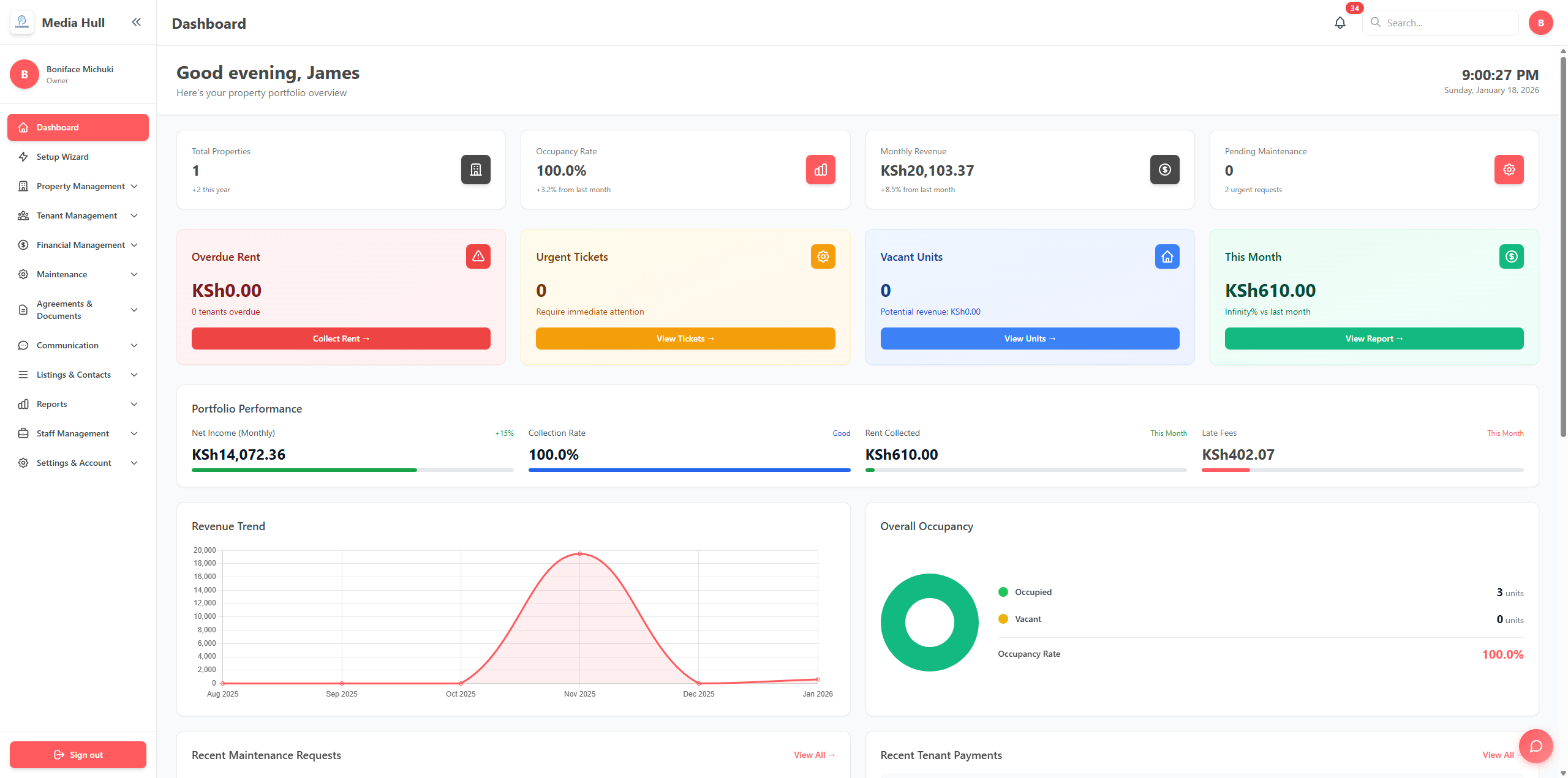
Modern property management systems integrate directly with M-Pesa to:
- Auto-match payments to correct tenants instantly
- Send automatic receipts the moment payment is received
- Track all transactions in one dashboard
- Generate financial reports with accurate M-Pesa data
- Eliminate manual reconciliation completely
Result: What took 15 hours now takes 15 minutes.
How M-Pesa Integration Actually Works (Technical Made Simple)
Step 1: Setup Your M-Pesa Business Account
You need one of these:
Option A: Paybill Number
- Best for: Landlords with 10+ units
- Cost: Free to set up via Safaricom
- Benefits: Professional, supports multiple accounts
- Setup time: 5-7 business days
Option B: Till Number
- Best for: Smaller landlords (5-15 units)
- Cost: Free to set up
- Benefits: Quick setup, instant activation
- Limitation: All payments to one account
Our Recommendation: Start with Till Number if you're under 20 units. Upgrade to Paybill as you scale.
Step 2: Connect to Property Management System
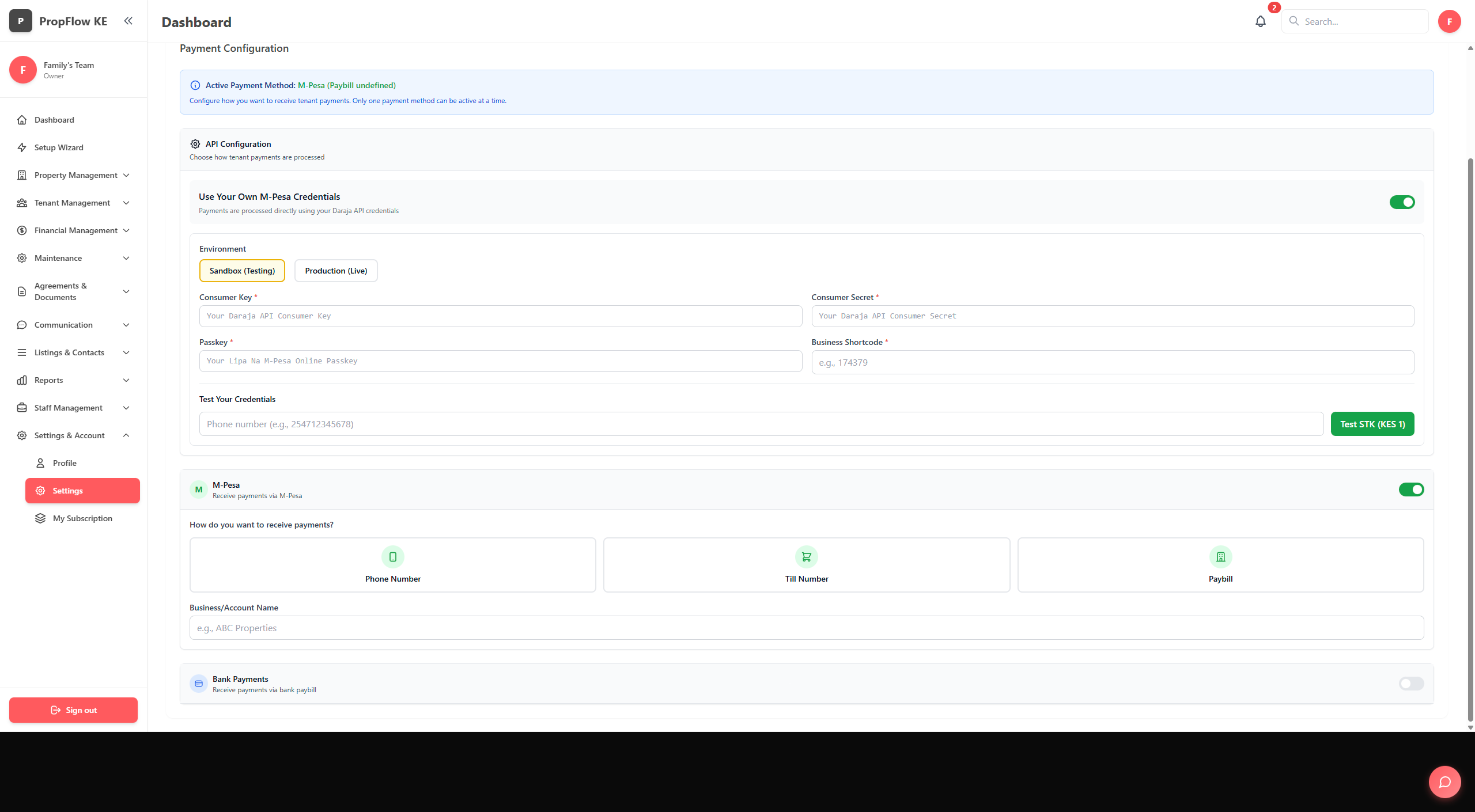
Once you have your Paybill/Till:
- Enter M-Pesa credentials in your property management dashboard
- System validates connection (takes 2 minutes)
- Set up payment reconciliation rules
- Test with a small payment
- Go live
Security Note: Use systems with C2B (Customer to Business) API integration for automatic reconciliation. Never share your M-Pesa PIN.
Step 3: Configure Automatic Matching
Smart systems match payments based on:
- Phone number (primary matching method)
- Tenant name (as entered in M-Pesa)
- Account number (unit reference in M-Pesa message)
- Amount (matches invoice amount)
Match rate: 95%+ automatic matching with proper setup.
Step 4: Handle Edge Cases
The 5% of payments that don't auto-match:
- System flags as "unmatched payment"
- You get notification
- Manual assignment in 10 seconds
- System learns for next time
No more mystery payments.
7 Ways M-Pesa Integration Transforms Rent Collection
1. Instant Payment Confirmation
Before:
- Tenant sends M-Pesa
- Calls you to confirm receipt
- You check SMS manually
- Update spreadsheet
- Call tenant back to confirm
- Send receipt via WhatsApp
Time: 10 minutes per payment x 30 tenants = 5 hours monthly
After (with automation):
- Tenant sends M-Pesa
- System auto-confirms in 5 seconds
- Digital receipt sent automatically
- Payment marked as complete
- Tenant sees updated balance in portal
Time: Fully automated, 0 minutes monthly
Time Saved: 5 hours per month = 60 hours annually
2. Real-Time Payment Tracking
See payments as they happen:
- Dashboard updates instantly when M-Pesa is received
- Visual status for each tenant (Paid, Pending, Overdue)
- Filter by property, date, amount
- Export payment data instantly
No more waiting for month-end reconciliation.
3. Automated Payment Reminders
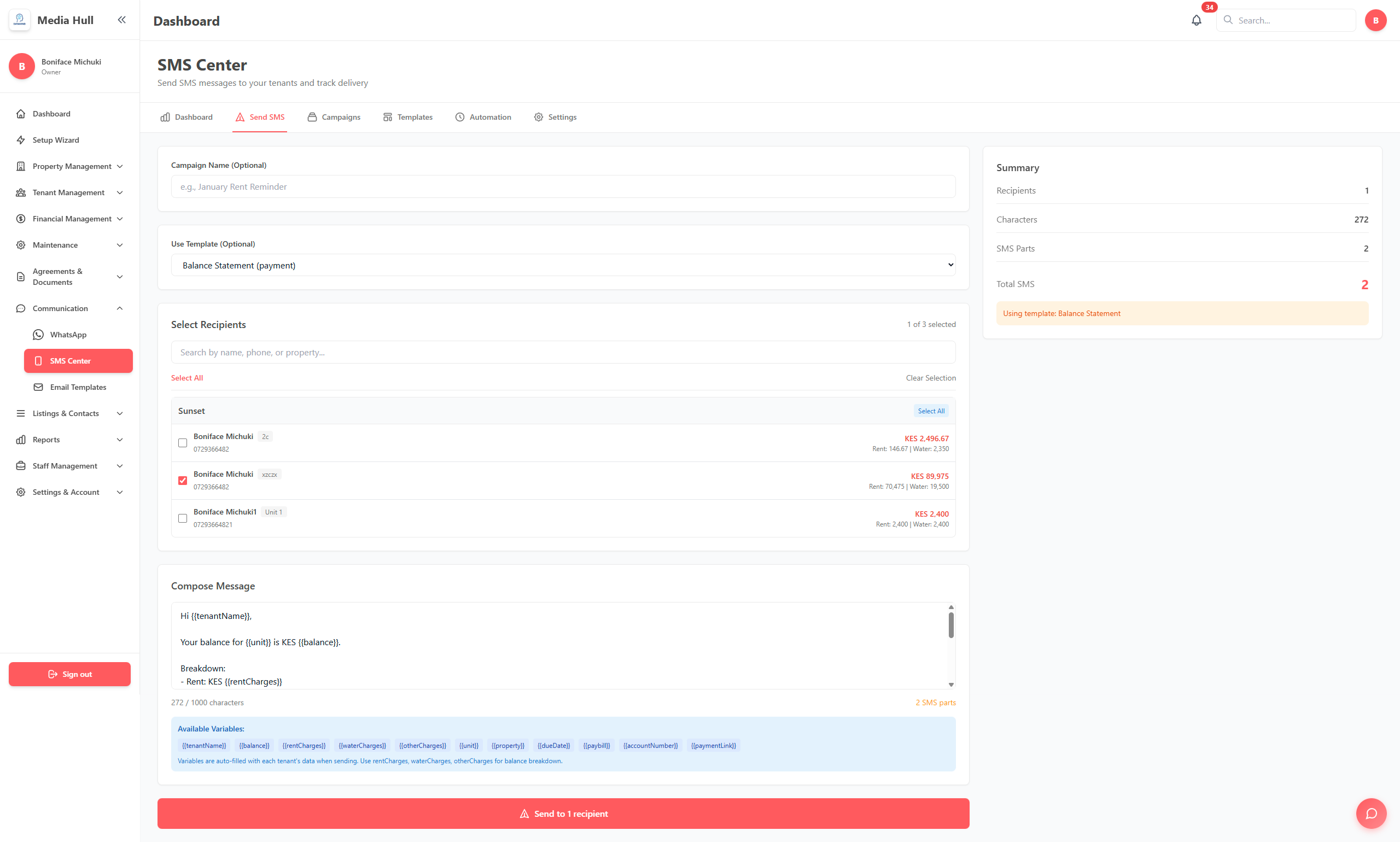
Smart reminder system:
- 7 days before: "Your rent of KES 25,000 is due on Dec 1st"
- Due date: "Rent is due today. Pay to Paybill 123456"
- 3 days after: "Your rent is 3 days overdue. Please pay KES 25,000 + late fee"
Delivered via: WhatsApp, SMS, and Email
Result: Reduce late payments significantly with automated reminders.
4. Partial Payment Support
Kenyan reality: Some tenants pay in installments.
How automation handles it:
- Tenant pays KES 10,000 (rent is KES 25,000)
- System records partial payment
- Updates balance to KES 15,000 remaining
- Sends acknowledgment: "Partial payment received. Balance: KES 15,000"
- Tracks until fully paid
No manual calculations needed.
5. Multi-Property M-Pesa Management
For landlords with multiple properties:
Challenge: Different properties, different Paybills/Tills
Solution:
- Link multiple M-Pesa accounts to one dashboard
- Automatic routing to correct property
- Consolidated financial reporting
- Property-by-property payment analysis
Example: Manage properties in Westlands, Kilimani, and South B from one system with separate M-Pesa accounts.
6. Automatic Late Fee Calculation
Configure once, run forever:
- Set late fee policy (e.g., 5% after 5 days)
- System calculates automatically
- Adds to tenant invoice
- Tracks in financial reports
- Tenant sees breakdown in portal
No more "I didn't know about late fees" disputes.
7. Tax-Ready Financial Reports
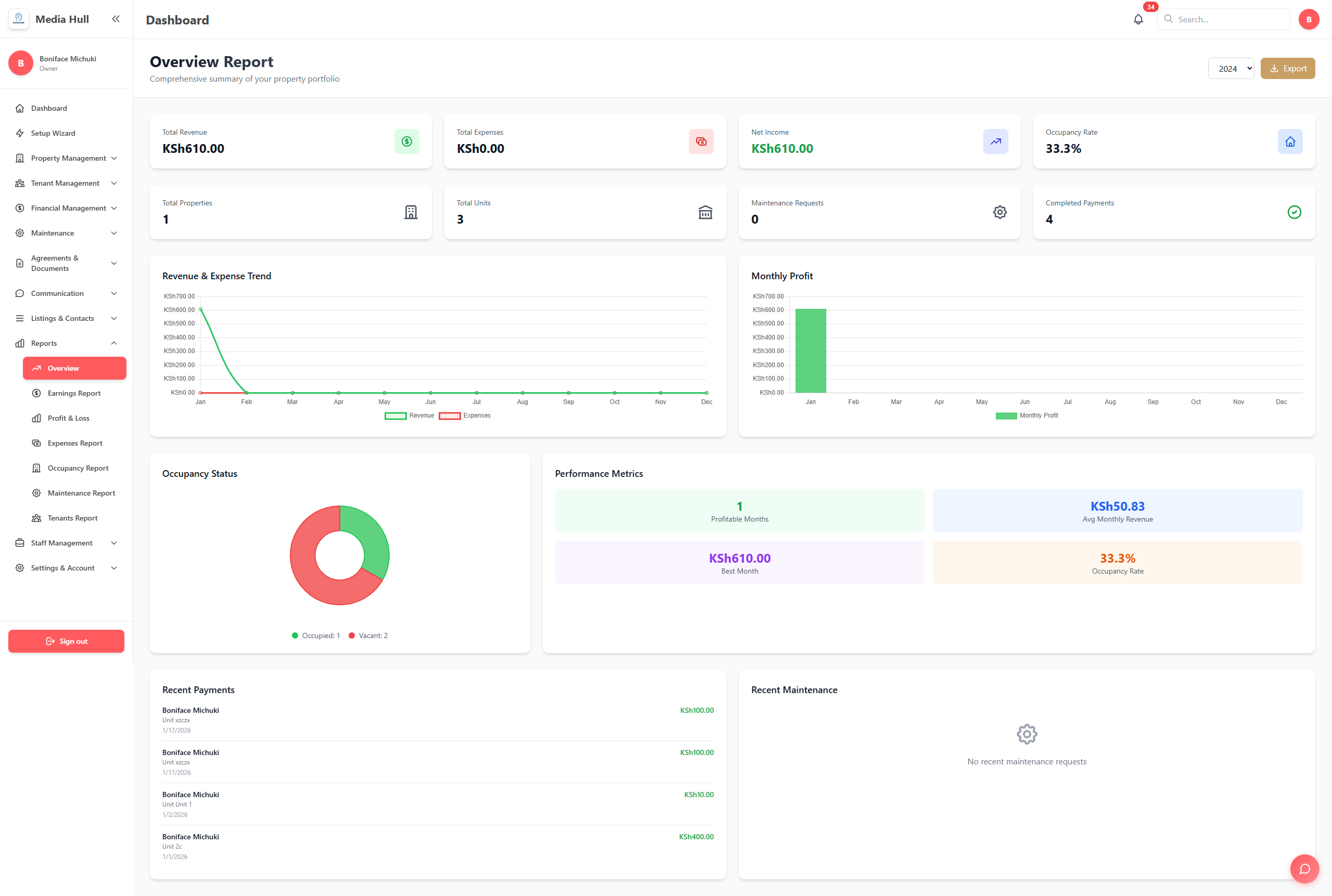
At month-end or tax time:
- Generate complete M-Pesa transaction report
- Filter by property, tenant, date range
- Export to Excel/PDF for accountant
- Matches KRA requirements
- Includes receipt references
Time saved: What took 2 days now takes 2 minutes.
Real Numbers: ROI of M-Pesa Automation
Case Study: Margaret, 25 Units in Kileleshwa
Before Automation:
- Time spent on M-Pesa reconciliation: 12 hours/month
- Late payments: 35% of tenants (average 8 days late)
- Payment disputes: 4-6 per month
- Stress level: High
Monthly rent collection: KES 625,000 Time wasted annually: 144 hours Lost income (delays): ~KES 50,000/year
After M-Pesa Integration:
- Time spent: 30 minutes/month (95% reduction)
- Late payments: 12% of tenants (average 2 days late)
- Payment disputes: 0-1 per month
- Stress level: Low
Time saved annually: 138 hours Additional income (faster collection): ~KES 45,000/year
ROI: Positive in first year from faster collections alone
Step-by-Step: Setting Up M-Pesa Rent Collection
Phase 1: Get Your M-Pesa Business Number (Week 1)
For Paybill:
- Visit Safaricom Business Center with:
- Business registration documents
- ID/Passport
- KRA PIN
- Apply for Paybill number
- Activation is free (no setup fee)
- Wait 5-7 days for activation
For Till Number:
- Download M-Pesa Business App
- Register business
- Apply for Till Number
- Get instant approval
- Start accepting payments
Phase 2: Choose Property Management System (Week 1-2)
Look for these M-Pesa features:
- Direct C2B API integration (not manual import)
- Automatic payment matching
- Real-time reconciliation
- Multi-property support
- Partial payment tracking
- Automated receipts
- Financial reporting
Phase 3: System Setup (Week 2)
-
Add Your Properties
- Enter property details
- Add units with rent amounts
- Set payment due dates
-
Import Tenant Data
- Upload tenant list (Excel template provided)
- Include: Name, phone number, unit, rent amount
- System validates M-Pesa phone numbers
-
Connect M-Pesa
- Enter Paybill/Till number
- Add API credentials (system guides you)
- Test connection with small payment
- Verify auto-matching works
-
Configure Automation
- Set reminder schedule
- Define late fee policy
- Customize receipt template
- Set up WhatsApp notifications
Setup time: 2-3 hours total
Phase 4: Tenant Onboarding (Week 3)
Notify tenants via WhatsApp:
"Dear [Name],
Starting Dec 1st, please pay rent to: Paybill: 123456 Account: Your Unit Number (e.g., A12)
You'll receive instant confirmation and can track payments in our tenant portal: [link]
Questions? Reply to this message."
Pro tip: Send sample payment instructions before first rent cycle.
Phase 5: First Month Live (Week 4)
Monitor closely:
- Check auto-matching rate (should be 90%+)
- Manually assign any unmatched payments
- Respond to tenant questions promptly
- Collect feedback
Optimization:
- Note common matching issues
- Improve tenant data quality
- Refine reminder timing
- Adjust late fee policy if needed
Common M-Pesa Rent Collection Challenges (And Solutions)
Challenge 1: "Tenant paid from different number"
Problem: Auto-matching fails because tenant used spouse's/friend's phone
Solution:
- Allow multiple phone numbers per tenant in system
- System suggests matches based on amount and name
- One-click manual assignment
- System learns for next time
Challenge 2: "Can't identify who paid"
Problem: Payment shows generic name or nickname
Solution:
- Require tenants to use account/unit number in M-Pesa
- System matches on amount + approximate name
- Flag unusual payments for review
- Maintain payment history for patterns
Challenge 3: "Wrong amount paid"
Problem: Tenant pays KES 24,000 instead of KES 25,000
Solution:
- System flags amount mismatch
- Creates partial payment record
- Auto-calculates balance
- Sends tenant notification with balance
- Tracks until fully paid
Challenge 4: "Payment disputes"
Problem: Tenant claims they paid, but you have no record
Solution:
- Digital audit trail of all M-Pesa transactions
- Show tenant their payment history in portal
- Receipt numbers for verification
- M-Pesa transaction IDs for disputes
- Export proof for tenant or Safaricom
Challenge 5: "M-Pesa downtime"
Problem: M-Pesa occasionally has service interruptions
Solution:
- System queues and processes when service returns
- Notify tenants of alternative payment method
- Extend deadlines if downtime on due date
- Maintain backup payment channel
Advanced M-Pesa Strategies for Savvy Landlords
Strategy 1: Incentivize Early M-Pesa Payments
Tactic: Offer KES 500 discount for rent paid by 25th of previous month
Implementation:
- Configure discount in system
- Auto-apply if payment received before date
- Track uptake and cash flow improvement
Result: Improve cash flow, reduce late payment chasing
Strategy 2: Use M-Pesa Data for Tenant Screening
Insight: Payment history predicts tenant reliability
How to use:
- Track on-time payment percentage
- Identify consistently late payers
- Factor into lease renewal decisions
- Prioritize reliable tenants for upgrades
Ethical note: Use data fairly and transparently
Strategy 3: Segment Reminders by Payment History
Smart automation:
- Reliable tenants (always on-time): 1 friendly reminder
- Occasional late (sometimes late): 2 reminders + call
- Chronic late (often late): 3 reminders + personal follow-up
Result: Reduce reminder fatigue, focus energy on problem cases
Strategy 4: Offer M-Pesa Payment Plans
For expensive properties:
- Allow rent split into 2-3 M-Pesa payments
- Configure in system (e.g., 15th and 30th)
- Automatic tracking and reminders
- Reduces tenant financial stress
Win-win: Higher retention, easier budgeting for tenants
M-Pesa Integration Costs: What to Expect
One-Time Costs
| Item | Cost (KES) |
|---|---|
| Paybill setup fee | 0 (Free) |
| Property management system setup | 0 (included) |
| Tenant onboarding time | 0 (DIY) |
| Total One-Time | 0 |
Monthly Costs
| Item | Cost (KES) |
|---|---|
| M-Pesa transaction fees | 0.50-1% per transaction |
| Property management software | 2,999-19,999 (based on plan) |
ROI Calculation (25 Units Example)
Monthly Costs: KES 7,999 (Professional plan) Monthly Benefits:
- Time saved: 12 hours x KES 500/hour = KES 6,000
- Faster rent collection: ~KES 4,000
- Reduced disputes: ~KES 2,000
- Total Monthly Value: KES 12,000
Net Monthly Benefit: KES 4,000+ Annual Benefit: KES 48,000+
Choosing the Right M-Pesa Property Management System
Essential Features Checklist
- Real-time M-Pesa integration (not manual imports)
- Automatic payment matching (95%+ accuracy)
- Multi-property support (if you have 2+ properties)
- Mobile apps (iOS and Android for you and tenants)
- Automated reminders (WhatsApp, SMS, Email)
- Partial payment tracking
- Financial reporting (tax-ready)
- Local support (Swahili and English)
- Data security (bank-level encryption)
- Free trial (2 months to test)
Questions to Ask Vendors
- "How does M-Pesa integration work technically?"
- "What's the typical auto-matching rate?"
- "How do you handle payments from different phone numbers?"
- "Can I connect multiple M-Pesa accounts?"
- "What happens if M-Pesa is down?"
- "How is my tenant data protected?"
- "What kind of support do you offer?"
- "Can I export M-Pesa data for my accountant?"
Red Flags to Avoid
- Manual M-Pesa statement uploads (defeats automation purpose)
- No mobile app (poor tenant experience)
- Complex setup requiring developer help
- No local customer support
- Unclear pricing or hidden fees
- No data security certifications
PropFlow: M-Pesa Integration Built for Kenyan Landlords
Key Features
Native M-Pesa Integration:
- Direct C2B API connection
- Real-time payment reconciliation
- High automatic matching rate
- Support for Paybill and Till Numbers
- Handles multiple M-Pesa accounts
Complete Automation:
- Automatic receipts via WhatsApp/Email
- Smart payment reminders
- Partial payment tracking
- Late fee calculations
- Financial reporting
Tenant Experience:
- Mobile app for iOS and Android
- Instant payment confirmation
- Digital receipts and statements
- Payment history tracking
Landlord Dashboard:
- Real-time payment visibility
- One-click financial reports
- Multi-property management
- Export for tax filing
Local Support:
- WhatsApp support in English and Swahili
- Phone and email support
- Setup assistance included
Pricing:
| Plan | Price | Properties |
|---|---|---|
| Starter | KES 2,999/month | Up to 3 |
| Professional | KES 7,999/month | Up to 10 |
| Enterprise | KES 19,999/month | Unlimited |
2-Month Free Trial (no credit card required)
Take Action: Automate Your M-Pesa Rent Collection Today
If you're still manually tracking M-Pesa payments, you're:
- Wasting 10-15 hours monthly
- Delaying rent collection by 5-8 days on average
- Increasing payment disputes
- Missing late payment revenue
- Creating unnecessary stress
The fix is simple: Automate M-Pesa integration with the right property management system.
Your 30-Day Action Plan
Week 1:
- Apply for Paybill/Till Number
- Sign up for PropFlow free trial
- Add properties and tenants
Week 2:
- Connect M-Pesa account
- Test payment flow
- Configure automation rules
Week 3:
- Onboard tenants
- Send payment instructions
- Monitor first payments
Week 4:
- Optimize based on results
- Roll out to all tenants
- Enjoy automated rent collection
Time to Value: 2-3 weeks from zero to fully automated
Final Thoughts: The M-Pesa Advantage
M-Pesa transformed payments in Kenya. But without proper integration and automation, landlords lose the full benefit.
The landlords winning in 2026:
- Have automated M-Pesa integration
- Collect rent 5+ days faster
- Spend 90% less time on payment tracking
- Provide better tenant experiences
- Make data-driven decisions
The landlords struggling:
- Still manually matching M-Pesa SMS
- Chasing late payments constantly
- Dealing with payment disputes
- Working IN their properties, not ON them
Which landlord will you be?
Try M-Pesa automation risk-free for 2 months with PropFlow. No credit card required. Setup in under 10 minutes.
About PropFlow
PropFlow is a property management platform built specifically for Kenyan landlords. We combine M-Pesa integration with comprehensive property management tools to make landlording easier.
Built by Kenyans, for Kenyan property owners.
Get Started: propflow.ke WhatsApp: 0701 822 032 Email: hello@propflow.ke
Related Articles:
- Automated Property Management in Kenya: 2026 Landlord Guide
- 10 Ways to Reduce Tenant Turnover in Nairobi Properties
- Complete Guide to Property Management Accounting in Kenya
Share this guide: Help fellow landlords discover automated M-Pesa rent collection.
Get Free Landlord Tips in Your Inbox
Join 500+ Kenyan property owners. Get M-Pesa collection tips, tenant management guides, and PropFlow updates every 2 weeks.
No spam. Unsubscribe anytime. We respect your inbox.
Related Articles
Keep reading
Stop Chasing Rent. Start Getting Paid.
Kenya's first one-click rent payment via WhatsApp + M-Pesa. Pay rent with one tap from WhatsApp.

Best Property Management Software in Kenya for Landlords in 2026
A detailed 2026 guide to choosing property management software in Kenya, covering M-Pesa rent collection, tenant records, maintenance, reports, KRA-ready records, and PropFlow.
How Much Kenyan Landlords Actually Lose to Late Rent (and 5 Ways to Fix It)
The real KES cost of late rent in Kenya, with a 12-unit Nairobi example and 5 fixes that drop late-payment rates from 20% to under 4%.